---
title: Uncategorized Items
description: This guide reviews how to assign a category to uncategorized items in the property catalog.
---
[Skip to content](https://help.re-ops.io/uncategorized-items#main-content)

Open main navigation
Close main navigation
- [re-ops.co](https://www.re-ops.co/)
[re-ops.co](https://www.re-ops.co/)
Hi. How can we help?
- There are no suggestions because the search field is empty.
1. [RE-OPS Help Center](https://help.re-ops.io/?hsLang=en)
2. [Property Catalog](https://help.re-ops.io/property-catalog?hsLang=en)
# Uncategorized Items
## This guide reviews how to assign a category to uncategorized items in your property catalog.
---
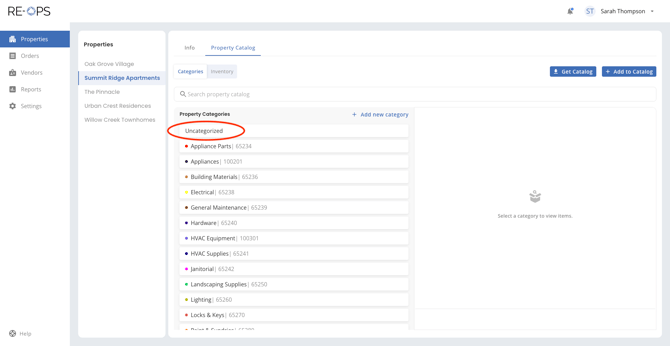
### **1. Navigate to Property Catalog \> Uncategorized**
Sign into RE-OPS on the Web, and then navigate to the Property Catalog within the Properties section. Click to view items in the Uncategorized bucket, as shown below.
### **2. Select item & click Add Category**
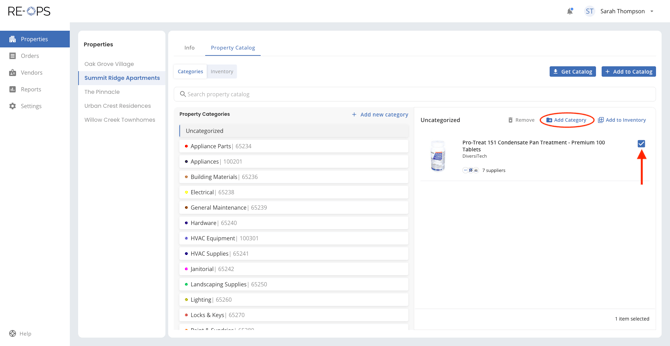
Find the items in the Uncategorized bucket. These are non-catalog items that were not categorized at the time of purchase.
Select an item that you wish to categorize, and click Add Category.
### 
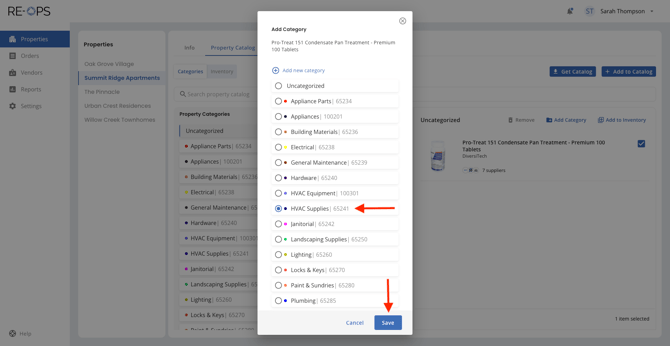
### **3. Select the desired category**
Select the desired category for the item, and then click Save. This is where the item will "live" in your property catalog.
Note: You can change the category later, if needed.
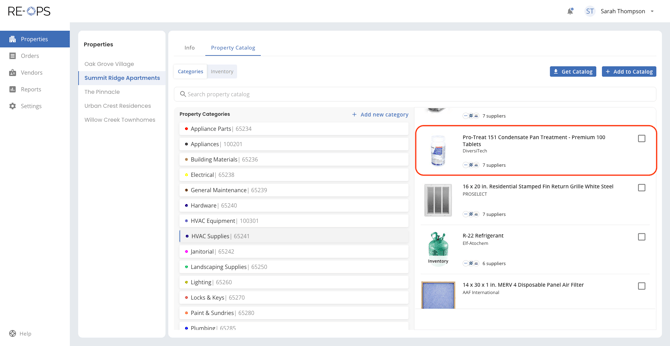
### **4. Recategorize complete**
And with that, the item can now be found in the newly assigned category.
Thanks for reviewing this guide! Should you have additional questions, please reach out to our team at [help@re-ops.co](mailto:help@re-ops.co). We're here to help!
- [Getting Started](https://help.re-ops.io/getting-started?hsLang=en)
- [Property Catalog](https://help.re-ops.io/property-catalog?hsLang=en)
- [Orders](https://help.re-ops.io/orders?hsLang=en)
- [Settings](https://help.re-ops.io/settings?hsLang=en)
- [Vendors](https://help.re-ops.io/vendors?hsLang=en)
- [Reports](https://help.re-ops.io/reports?hsLang=en)
[](https://help.re-ops.io/?hsLang=en)
Conquering the chaos of procurement.
Copyright © 2026, re-ops.co