
Overview
The Savings Summary report shows how much your organization is saving by purchasing items at the most competitive supplier price available in RE-OPS.
This report helps corporate teams understand:
- Where savings are being realized across the portfolio
- Which properties and categories are driving the most value
- How effectively spend is being exposed to supplier competition
Before reviewing the report, let's review the below list of metrics.
Key Supporting Metrics
- Total Spend: All purchasing activity during the selected timeframe
- Competitive Spend: The portion of spend where multiple suppliers offered the same product
- Average Supplier Price: The average price across suppliers for the same item
- Purchase Price/Price Paid: The price paid based on the selected supplier
- Savings (%): Savings expressed as a percentage of competitive spend
How Savings Are Calculated
-
Savings are calculated when multiple suppliers offer the same product and pricing can be compared.
-
Savings are generated when an item is purchased below the average supplier price.
Example:
- Average supplier price: $20
- Purchased price: $15
- Savings: $5
Note: If only one supplier offers a product, there is no opportunity for comparison, and savings are not calculated.
Reviewing the Report
1. Navigate to Reports
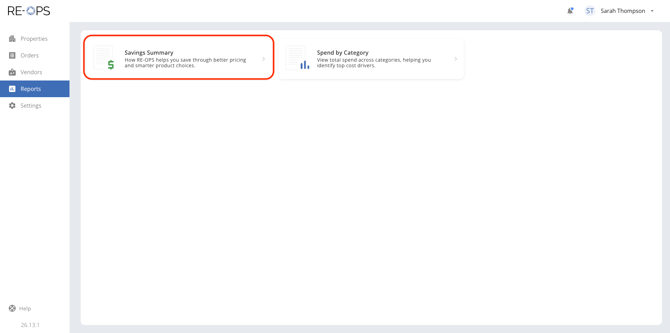
Sign into RE-OPS on the Web, and then navigate to the Reports section and click the Savings Summary.
2. Setting the Filters
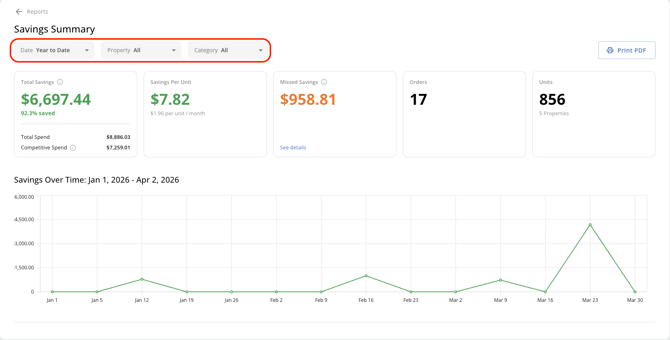
The Savings Report can be filtered by Date, Property, and Category. Use the filters to help identify trends and compare performance across different segments of your portfolio.
3. Savings Summary
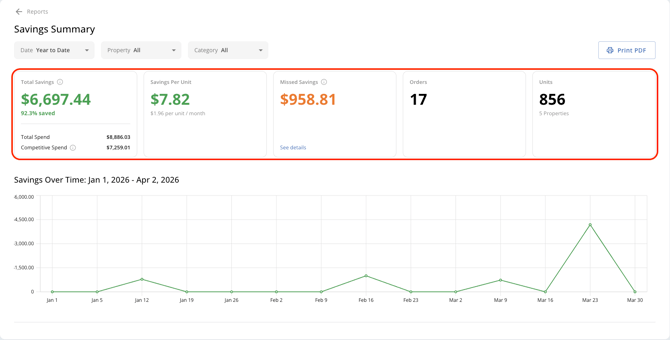
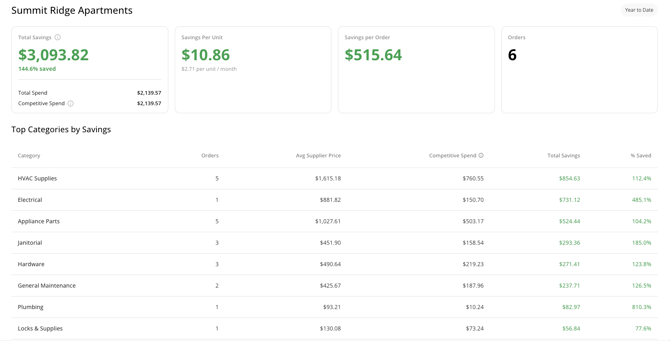
When viewing the report, start at the summary level. Review total savings and key metrics to understand overall performance across your portfolio.
4. Savings Over Time
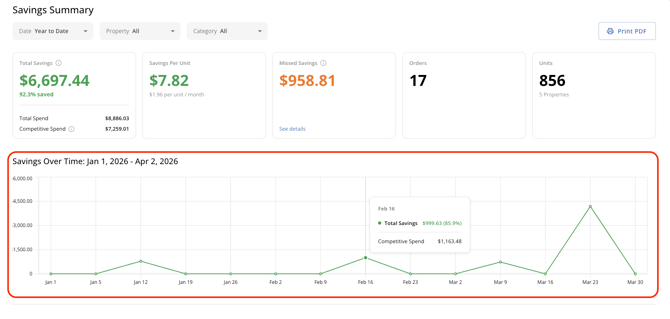
The Savings over Time graph makes it easy to chart your portfolio's savings over a specific time period. Hovering the trend line will provide the Total Savings and Competitive Spend for the time period.
5. Top Categories by Savings
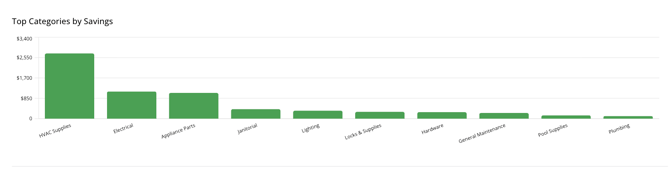
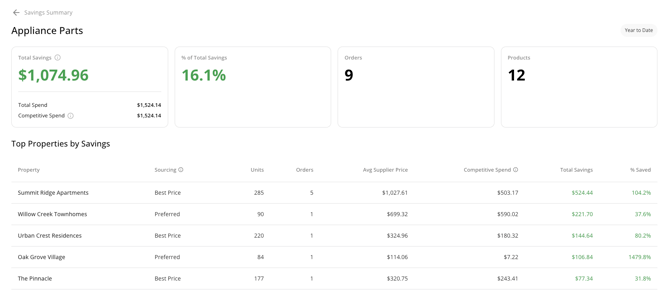
The Top Categories by Savings chart highlights which product types are generating the most savings. Click a category to drill into more impactful data, including top performing properties and items in the specific category.
6. Top Properties by Savings
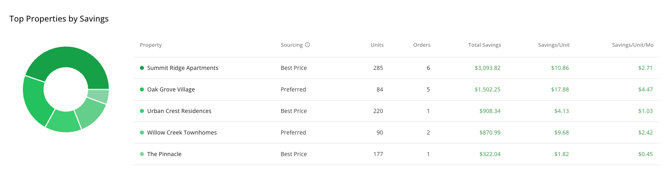
The Top Properties by Savings section highlights which properties are generating the most savings. Click any property to drill into more impactful data, including top performing categories and items for the selected property.
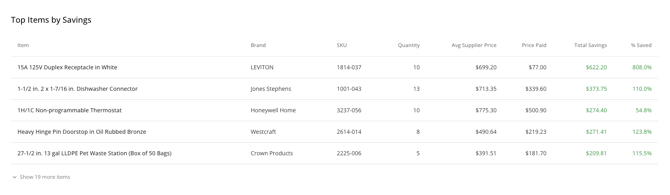
7. Top Items by Savings
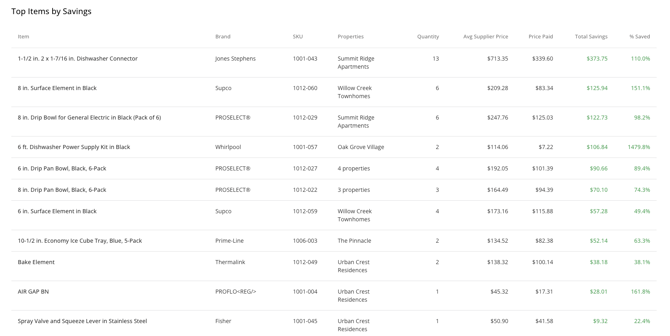
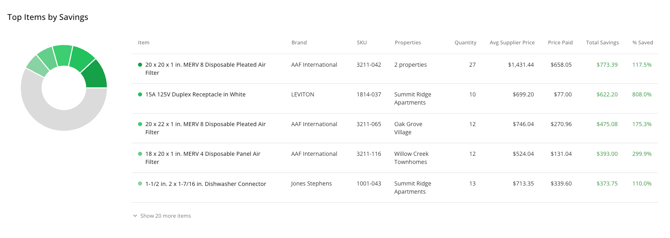
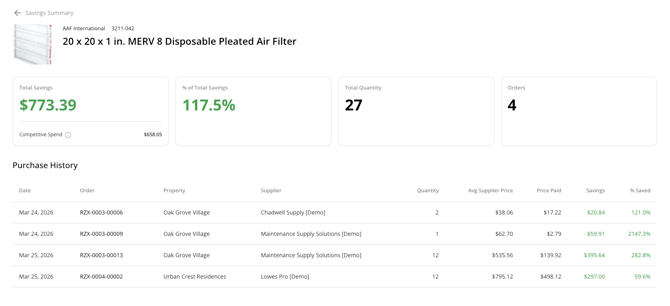
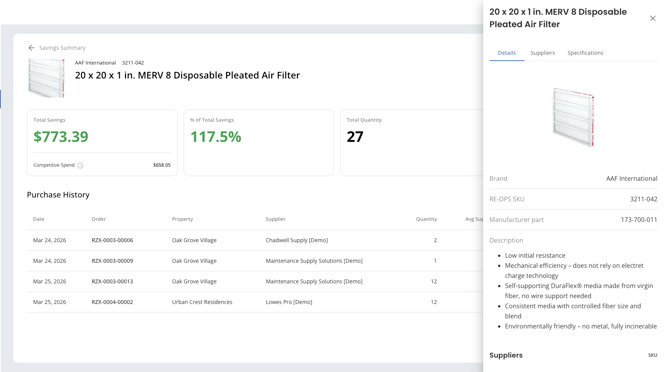
The Top Items by Savings chart highlights which items are generating the most savings. Click an item to drill into more impactful data, including purchase history contributing to the savings.
Pro tip: When viewing an item, clicking the item name will display the item detail panel featuring descriptions, specs, and more (shown below).
8. Missed Savings
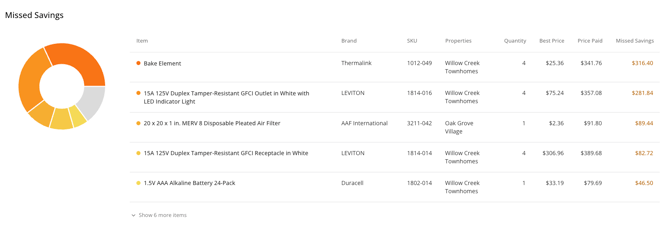
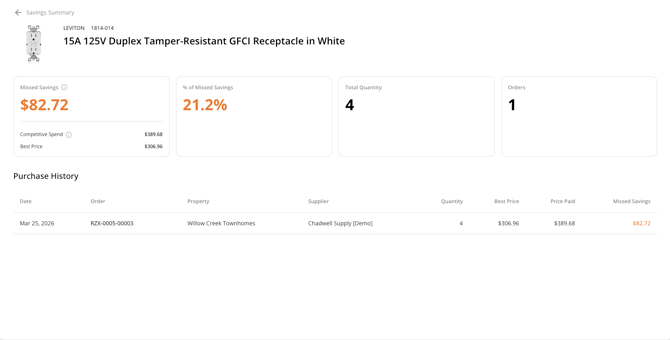
The Missed Savings chart highlights which item purchases resulted in a missed savings.
Purchase Price > Best Price = Missed Savings
Click an item to dive into more impactful data, including purchase history contributing to the missed savings.
Pro tip: Click the order # to navigate to that specific order in RE-OPS.
Frequently asked questions
Why don’t I see savings for all purchases?
Savings are only calculated when multiple suppliers offer the same product and pricing can be compared. If the item is only offered by a single supplier, then there can be no savings.
Why does savings vary by property or category?
Savings depends on:
- Supplier availability
- Price differences between suppliers
- Purchasing patterns at the property level
Why might savings be lower than expected?
Lower savings can occur when:
- A property's product sourcing settings prioritize a "preferred supplier" over "best price."
- A team member manually selects a higher-priced supplier
- There is limited competition for certain products
- Pricing across suppliers is similar
How can I ensure we are saving the most on each purchase?
To position your team to achieve the highest savings, follow the below guidelines:
- Ensure each property's Product Sourcing Settings (Settings>Orders>Product Sourcing) are set to prioritize Best Price (not a preferred supplier).
- Coach all team members not to manually select suppliers within an order. Instead, allow RE-OPS to select the suppliers (by best price).
- Build your property catalog with items that can be sourced by multiple suppliers. Supplier competition creates savings opportunities.