
In today’s environment, properties rely on multiple supplier partners to keep operations running smoothly. Product Sourcing Preferences help ensure every order is placed according to your standards—consistently and automatically
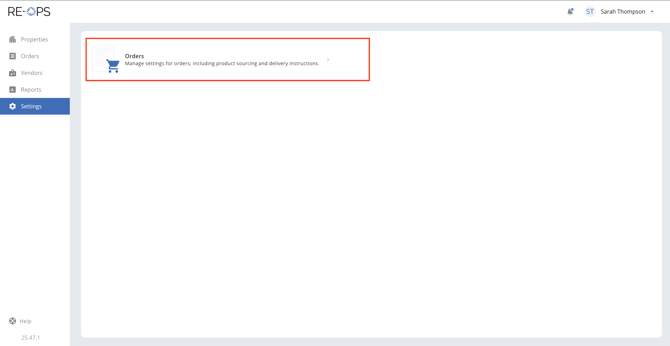
1. Navigate to Settings > Orders
Sign into RE-OPS on the Web, and then navigate to Settings, and then click Orders.
2. Select a Property
If you have access to multiple properties, be sure to first select the desired property in the drop-down located at the top-left. 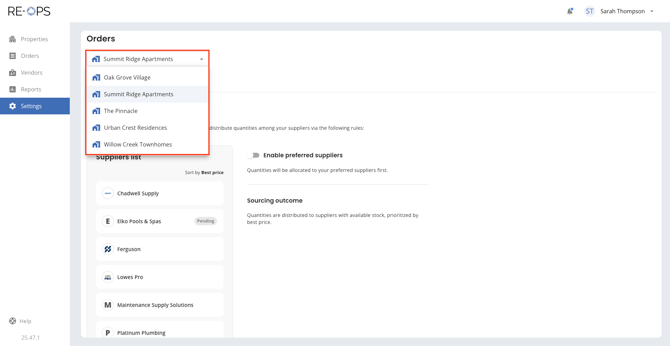
3. Set up sourcing rules for your property
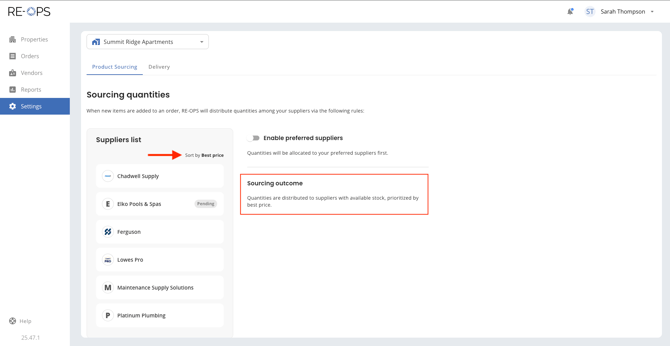
When setting up the product sourcing settings for your property, select one of the two options outlined below. - Option 1 (default): Best Price
- Many properties choose to fill all orders using best price as the guiding principle, and this is the default set up in RE-OPS. Using Best Price ensures that every item will be ordered from the supplier with the lowest price.
- Option 2: Preferred Suppliers
- In this scenario, your property will specify one or more preferred suppliers, and the supplier relationship will be prioritized over price. While another supplier may offer an item at a lower price, RE-OPS will select your preferred supplier to source the product.
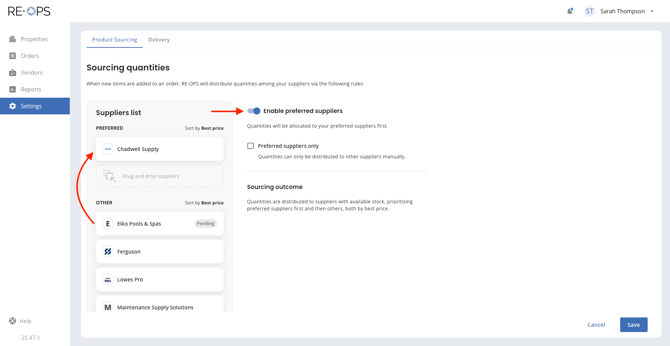
- To set up preferred suppliers for your property, toggle 'Enable preferred suppliers' and then drag your preferred supplier(s) into the Preferred bucket, as shown below. You may specify several preferred suppliers, if desired.
NOTE: If your preferred supplier is out of stock, the order will be filled by a supplier in the 'OTHER' bucket, prioritized by best price.
- To set up preferred suppliers for your property, toggle 'Enable preferred suppliers' and then drag your preferred supplier(s) into the Preferred bucket, as shown below. You may specify several preferred suppliers, if desired.
- In this scenario, your property will specify one or more preferred suppliers, and the supplier relationship will be prioritized over price. While another supplier may offer an item at a lower price, RE-OPS will select your preferred supplier to source the product.
-
-
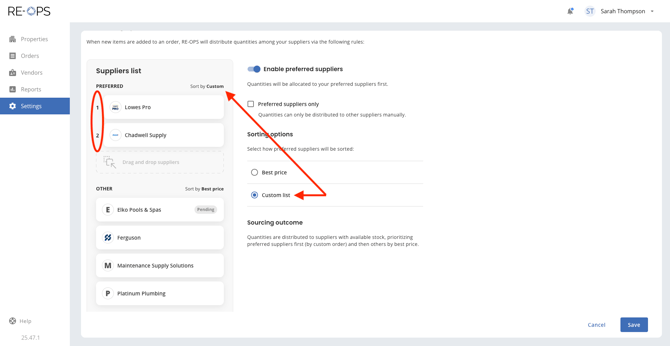
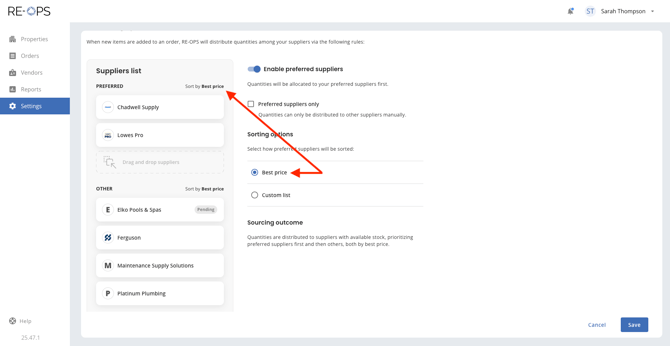
If your property will be naming multiple preferred suppliers, you can specify how RE-OPS should prioritize within those preferred suppliers.
- Custom List: This option will allow you to set a custom order (drag & drop).
- Best price: This option will always prioritize by price (lowest to highest).
-
-
-
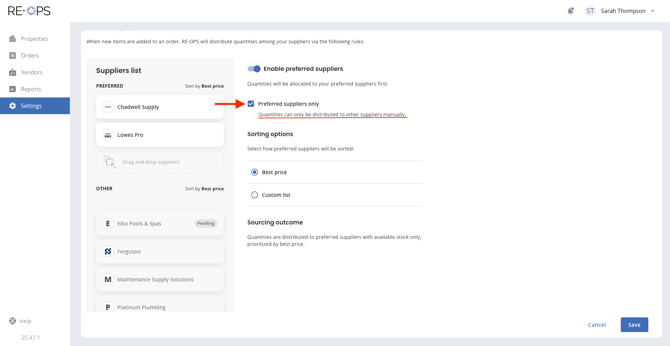
If your property will be naming preferred suppliers, you also have the option to limit all ordering to those preferred suppliers. Checking 'Preferred suppliers only' will allow the RE-OPS engine to ONLY source product from the preferred suppliers. If your preferred suppliers are out of stock, a team member will need to manually select another supplier to fill the order.
-
As stated earlier in this guide, most properties will choose to source all orders using Best Price (default), to ensure they save the most on every order.
Thanks for reviewing this guide! Should you have additional questions, please reach out to our team at help@re-ops.co. We're here to help!